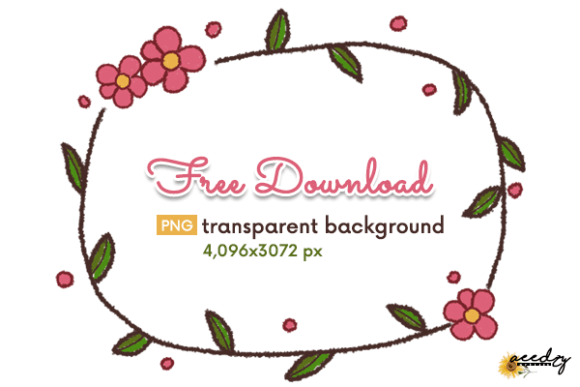
Floral Wreath Digital Assets: A Practical Guide for Designers and Crafters
In the evolving landscape of digital design and physical crafting, the Floral Wreath has emerged as a versatile cornerstone element. Whether you are designing a wedding invitation suite, creating custom wallpaper for a boutique website, or assembling a scrapbook page, the circular arrangement of botanicals offers a sense of completeness and elegance. However, not all digital floral assets are created equal. Understanding the specific attributes of high-quality digital paper designs, such as resolution, file format, and transparency, is crucial for achieving professional results.
This article explores the utility of the Floral Wreath in both computer graphics and physical projects. We will examine why this specific design format is preferred by many creatives, compare it with alternative botanical layouts, and discuss the technical specifications that determine its usability across various platforms.
Defining the Digital Floral Wreath
A Floral Wreath in the context of digital design is a pre-rendered graphic element featuring flowers, leaves, and stems arranged in a circular or oval pattern. Unlike static background patterns, these assets are typically isolated on a transparent background, allowing designers to layer them over text, photographs, or other design elements without visual conflict.
The distinct advantage of using a dedicated Floral Wreath asset lies in its compositional balance. The circular shape naturally draws the eye toward the center, making it an ideal frame for titles, monograms, or central imagery. When sourced as a high-resolution PNG file, such as one with dimensions of 4,096 x 3,072 pixels, the asset retains crispness even when scaled for large-format prints like gift wrapping or fabric designs.
Comparing Formats: PNG Transparency vs. JPEG Backgrounds
When evaluating digital resources for creative projects, the file format is often the most critical decision factor. Most premium Floral Wreath downloads include a PNG file with a transparent background. This is significantly different from standard JPEG images, which come with a solid white or colored background.
- PNG (Portable Network Graphics): Supports transparency. This allows the wreath to be placed seamlessly over any color, texture, or photograph. It is essential for web design, logo creation, and layered print projects.
- JPEG (Joint Photographic Experts Group): Does not support transparency. Using a JPEG wreath requires additional editing steps to remove the background, which can result in jagged edges or loss of detail in delicate petals and leaves.
For users working with editor programs ranging from Adobe Photoshop to free online tools like Canva, the PNG format offers immediate usability. The time saved on background removal allows creators to focus on layout and typography rather than technical cleanup. Furthermore, a resolution of 72 DPI is standard for screen-based applications, ensuring fast loading times for blogs and shop banners while maintaining visual clarity.
Use Cases: From Digital Screens to Physical Crafts
The versatility of the Floral Wreath extends far beyond simple decoration. Its application varies significantly depending on whether the end product is digital or physical. Understanding these contexts helps in determining if this resource fits your current project needs.
Digital Applications
In the digital realm, the Floral Wreath is a staple for branding and user interface design. For bloggers and online shop owners, these graphics serve as effective headers for blog posts or promotional banners. The organic shapes soften the rigid structure of web layouts, creating a welcoming aesthetic.
Social media managers frequently utilize these assets for story templates and post overlays. Because the files are easy to use with any editor program, non-designers can quickly produce polished content. Additionally, digital planners and journal covers benefit from the lightweight nature of PNG files, which do not bloat file sizes excessively while adding visual interest.
Physical Projects and Printables
While 72 DPI is optimized for screens, many modern printers and home printing setups can handle these files effectively for small to medium-sized physical items. The 4,096 x 3,072 pixel dimension provides enough data for high-quality prints of cards, unique shop tags, and scrapbooking elements.
For larger physical applications, such as fabric printing or full-sheet wallpaper, users should be aware of the resolution limits. While the image is crisp at standard viewing distances, scaling it to very large formats may reveal pixelation. In such cases, the Floral Wreath is best used as a repeating pattern or a focal point rather than a stretched background. However, for paper crafts, photo albums, and gift wrapping, the provided resolution is generally sufficient to produce sharp, professional-looking results.
Evaluating Alternatives: When to Choose a Wreath
While the Floral Wreath is popular, it is not the only botanical design option available. Comparing it with other styles helps in making an informed choice.
- Floral Borders: These run along the edges of a page. They are better suited for documents with heavy text content where a central frame might obstruct reading. A wreath is superior when the goal is to highlight a central element.
- Scattered Elements: Individual flowers and leaves offer maximum flexibility but require more time to arrange. A pre-made Floral Wreath saves time and ensures proportional balance, making it ideal for quick turnaround projects.
- Full Background Patterns: These cover the entire canvas. They are useful for wallpaper or fabric but can overwhelm smaller designs like tags or cards. The wreath offers a balanced approach, providing decoration without dominating the negative space.
The decision often comes down to the complexity of the project and the skill level of the creator. For those seeking efficiency and professional composition without extensive design training, the Floral Wreath is often the optimal choice.
Technical Considerations and Best Practices
To maximize the potential of your Floral Wreath assets, consider the following technical factors during your workflow.
Color Management: Digital screens display colors in RGB, while printers use CMYK. A Floral Wreath that looks vibrant on your monitor may appear slightly duller when printed. It is advisable to perform a test print on the intended paper stock before committing to a large batch of cards or tags.
Layering Techniques: When using the PNG file in graphic design software, utilize layer masks to blend the wreath with background textures. This creates a more integrated look, especially for scrapbooking and journal covers where a "flat" digital look might feel out of place.
File Organization: Since the zip file includes high-resolution assets, ensure your storage and backup systems are robust. These files are larger than standard web images due to their pixel dimensions. Keeping them organized in folders by theme or season can streamline future projects.
Making the Right Choice for Your Project
Choosing the right design resource involves balancing aesthetic desires with practical constraints. The Floral Wreath is an excellent choice if you need a focal point that frames content elegantly. It is particularly well-suited for:
- Wedding and event stationery
- Branding materials for boutiques and cafes
- Personalized gift tags and packaging
- Digital content creation for social media
However, if your project requires seamless tiling across a large surface or intricate, custom botanical arrangements that deviate from circular symmetry, you might need to explore vector-based illustrations or custom commission work. Vectors allow for infinite scaling without quality loss, which is beneficial for large-scale signage or vehicle wraps.
Ultimately, the value of a high-quality Floral Wreath PNG lies in its ease of use and immediate visual impact. For the majority of card makers, web designers, and crafters, the combination of transparent backgrounds, high pixel dimensions, and universal compatibility makes it a reliable tool in the creative toolkit. By understanding its strengths and limitations, you can integrate these assets into your workflow efficiently, enhancing your projects with minimal effort.